The subject fills the portrait frame and both edges disappear.
Change the layout to the documented pad operation and rerun the two edge checks. Cropping is a different delivery decision.
Hands-on recipe
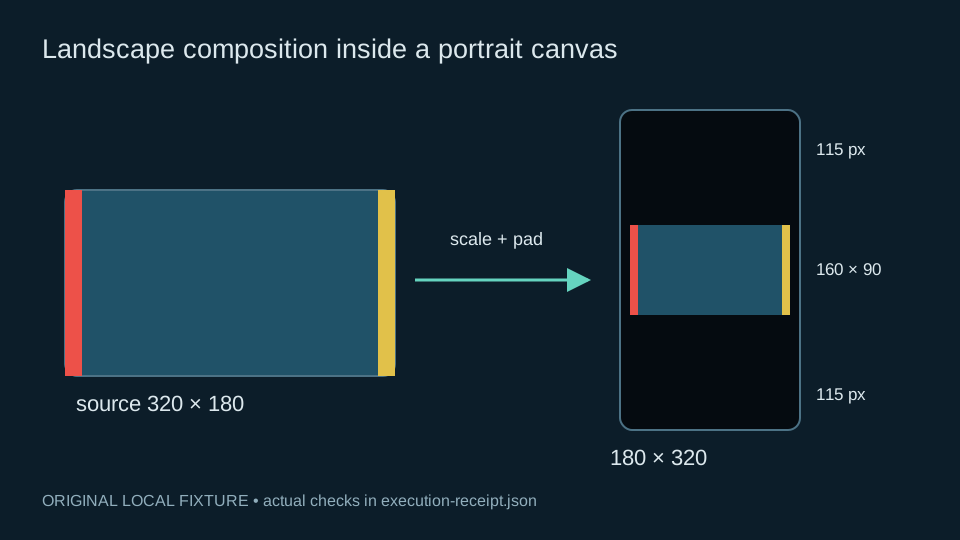
Make a vertical review file while preserving the complete landscape composition. The fixture chooses a 160×90 content rectangle with 10-pixel side margins and 115-pixel top/bottom margins.
Includes executed local fixtures, scripts and receipts. These checks do not represent a video-generation service run.
node run-recipe.mjs --out ./my-run
The script makes the landscape fixture with visible markers on both source edges. Those markers are acceptance targets: losing either edge during conversion would remove source composition, even if the result still has a valid portrait dimension.
Apply scale=160:90:flags=neighbor,pad=180:320:10:115:color=black,setsar=1. The 160×90 rectangle preserves 16:9 exactly; the outer canvas is 9:16. Its small side margins deliberately avoid rounding the landscape content to a distorted 180-pixel width.
Fully decode the exported file into RGB. Compare its 160×90 interior against an independently scaled source frame, using a maximum channel difference tolerance of four. The recorded fixture measured zero. This tolerance and yuv444p fixture are not a general colour-management qualification.
Check ten output frames, black top and bottom padding, a red left marker and a yellow right marker. The negative case is a local arithmetic aspect-ratio guard: the deliberately unequal cross-products reject stretching. It does not encode a stretched bad file or exercise a general product validator. Keep the measured offsets and actual max RGB difference in the receipt.
Change the layout to the documented pad operation and rerun the two edge checks. Cropping is a different delivery decision.
Change only the content dimensions back to 160×90 before padding; verify the exact 16:9 ratio by cross-multiplication.
Compare the tool version and pixel format first. Rerun the supplied yuv444p fixture before changing the tolerance for a separate delivery codec.
The measured file proves this layout conversion on the original tiny fixture. Confirm a distribution platform’s codec and resolution requirements separately before using the same geometry for a final upload.